One tap at the stop. A fair seat on the shuttle.
Residents tap “I'm at the stop” and get a numbered seat in order of arrival, at every building and at the mall on the way back. The driver just glances at their phones at the door. No scanning, nothing to install in the lobby.
- No app to download
- Sign in with LINE
- Thai & English
- No hardware in the lobby
Driver · Building 3
The problem
The bus is full before it reaches the second building.
The shuttle picks up at the first building, where people who arrived later take the seats of people who have been waiting at the next stop. On the way back, residents crowd a pickup point shared with a dozen other shuttles. Nobody can see who came first, so every rush hour ends in complaints to the management office.
Today, without a system
6
of the earliest arrivals at the second stop are left behind, while people who arrived later at the first stop board.
With Smart Shuttle Queue
0
people overtaken in the queue. Seats go in order of arrival, across every stop.
Example scenario: a 12-seat shuttle, 10 residents waiting at the second stop, then 8 at the first. Results from the product's queue engine on fictional data.
A queue does not create seats. When demand regularly exceeds capacity, your reports show it, with the numbers you need to justify an extra peak departure.
How it works
One minute to sign up. One tap per trip.
Nothing to download, nothing to install at the stops, and the driver never has to scan anything.
-
1
Sign up once
Residents scan the poster in the lobby and sign in with LINE in one tap, or with an e-mail. They enter the condo code and their unit. The account works straight away.
-
2
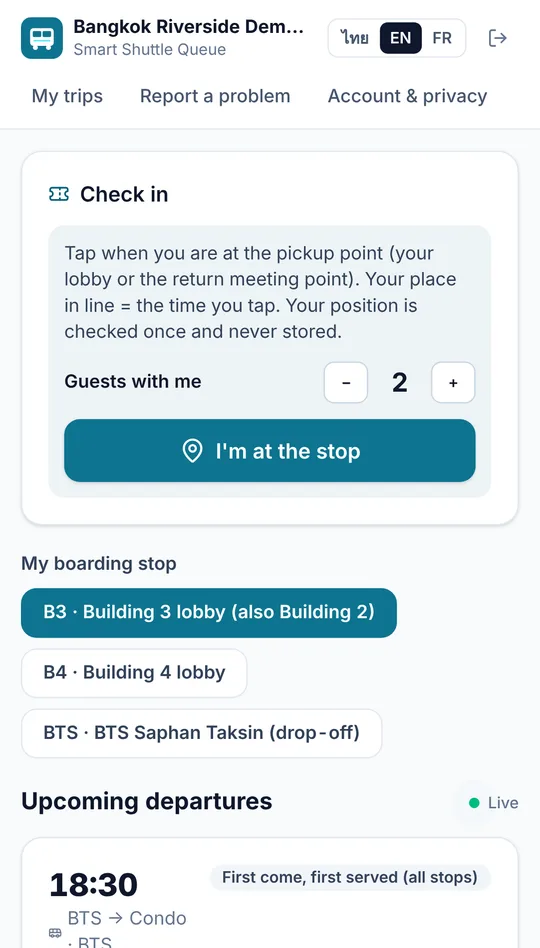
Tap “I'm at the stop”
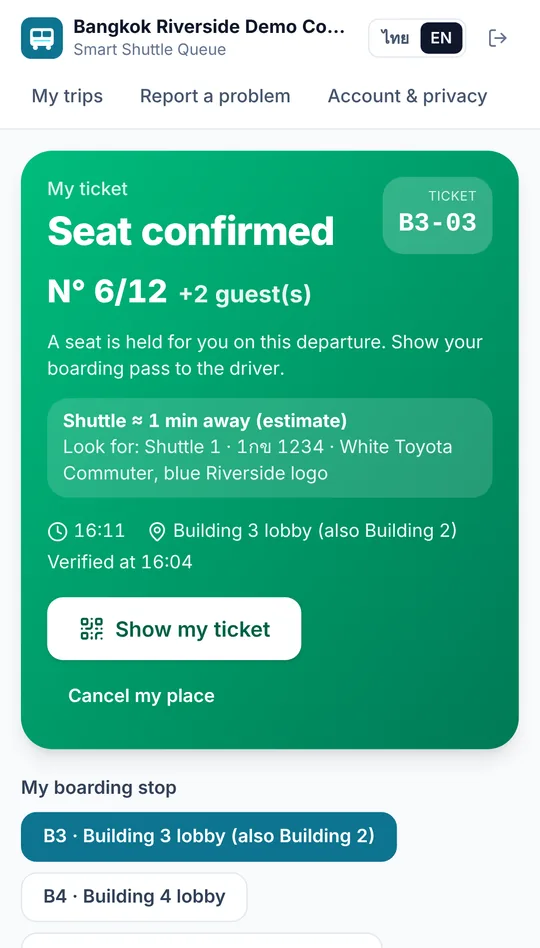
The phone confirms they are at the stop, once. Travelling with family or guests? Add “+2” and the group gets seats together. Everyone gets a number in order of arrival.
-
3
Show the live ticket
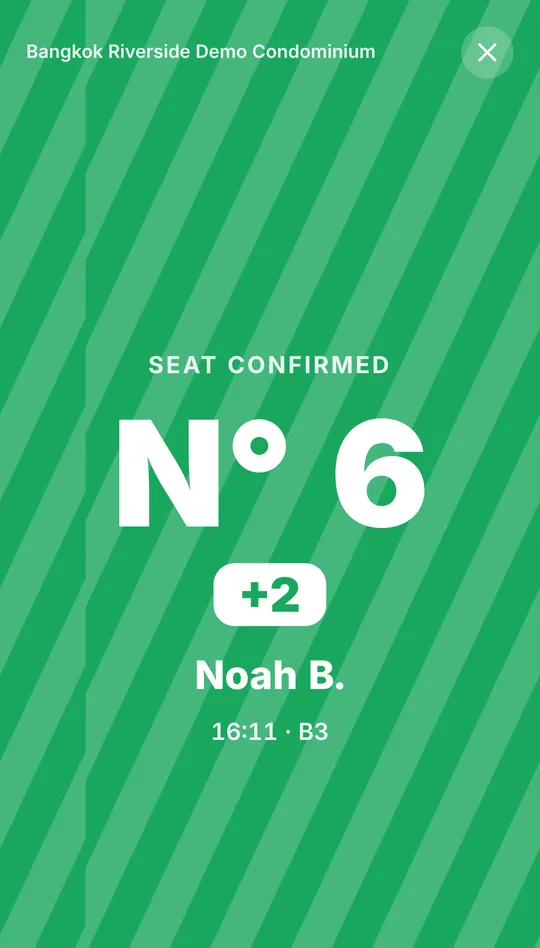
A full-screen ticket with today's colour, moving stripes and a ticking clock. A screenshot or yesterday's ticket is spotted at a glance, like a mobile bus ticket.
-
4
The driver taps twice
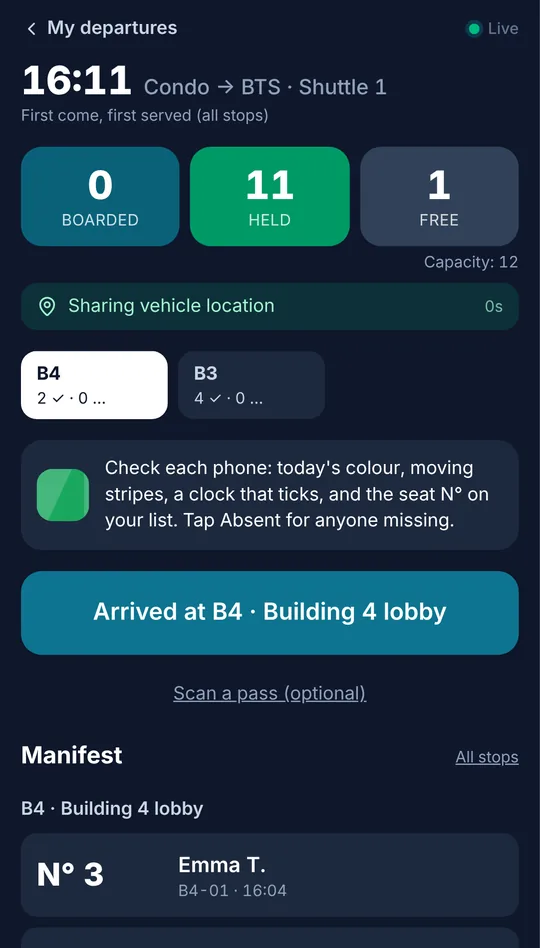
“Arrived”, a look at the phones, then “Leave stop”. If someone on the list is missing, one tap on “Absent” gives the seat to the next person, whose screen turns green.
The app, screen by screen
What residents and drivers actually see.
Real screens from the app, with demo data. Residents use it in their phone's browser or inside LINE, in Thai or English.
Return trips
Fair on the way back too, even at a crowded shared stop.
Mall and BTS pickup points are often shared by a dozen condo and hotel shuttles, and you cannot put a screen or a sign there. Smart Shuttle Queue needs nothing on site: residents tap “I'm at the stop” as soon as they arrive, and their place is kept while they wait in the shade.
- Each stop has a check-in zone you set on the map in the back-office
- Residents see the shuttle's estimated arrival and their place in the queue
- No more crowding at the door when your shuttle pulls in
Illustration.
Features
Simple for residents and drivers. Clear for management.
Residents
- Opens in the browser or inside LINE, in Thai or English
- One tap “I'm at the stop”, with guests
- Seat number and waiting list position, live
- Notification when a seat frees up
- Shuttle's estimated arrival time
Drivers
- Passenger list in boarding order, with guests
- Three big buttons: Arrived, Absent, Leave stop
- Today's colour shown on screen to match tickets
- Optional scanning, only if the building wants it
- Keeps working with a weak signal and syncs later
Management
- Live KPIs: waiting, boarded, left behind, average wait
- The shuttle on a map with its next-stop ETA
- Stops, check-in zones, timetable and vehicles
- Resident list: disable an account in one click
- Monthly reports and CSV export for the committee
Residents without a smartphone? The concierge checks them in from the staff screen in a few seconds. They keep their place in the same queue as everyone else.
Talk to usLive operations
See the shuttle and the queue, as it happens.
The management office sees today's figures update by themselves: who is waiting at each stop and for how long, residents left behind, no-shows. The shuttle appears on a map with an estimated arrival time at the next stop.
- Position from the driver's phone during trips, or a 4G GPS tracker in the vehicle
- Only the vehicle appears on the map, never residents
Waiting
18
Boarded
142
Left behind
0
Avg wait
6 min
Illustration. The product shows your real stops on a street map.
What you need to start
A poster in the lobby
With the sign-up QR code and the condo code. We send you the print file, in Thai and English.
A phone for the driver
Any recent smartphone works. Or our driver kit: a phone fixed in the vehicle, always charging, with a data SIM. To buy or rent.
A 4G tracker (optional)
For round-the-clock vehicle position. Most existing fleet trackers can send us their position directly. To buy or rent.
Beyond condominiums
Anywhere a shuttle stops more than once.
The same queue works on any route with several pickup points and limited seats.
Hospitals
Staff shuttles at shift changes, and visitor shuttles between car parks, buildings and the station.
Hotels & serviced apartments
Guest shuttles to the BTS and malls, with the same shared pickup points as condos.
Office parks & campuses
Last-mile shuttles between towers and transit, with usage reports per company or faculty.
Factories
Employee buses on several routes and shifts. HR sees who rode and how full each bus was.
Built for Thai condominiums, and for residents' privacy.
Designed with PDPA in mind
Minimal data, consent at sign-up, data export and account deletion, configurable retention.
Location checked once, never followed
The phone's position is used only at the moment a resident taps “I'm at the stop”, to confirm they are there. Residents are never tracked.
Discreet by default
Drivers see first names and seat numbers, never unit numbers.
Stricter when you need it
If the condo code circulates, switch to approved sign-ups, building access cards or ticket scanning in one click.
Pricing
A monthly subscription per condominium.
Every plan starts with a free pilot. Prices exclude VAT.
Starter
฿990 / month
- Up to 2 vehicles, 3 stops
- Return trips from a shared pickup point
- Live map with arrival times
- LINE sign-in, Thai & English
- Live KPIs and monthly report, 2 administrators
Pro
Most condos฿1,990 / month
- Up to 4 vehicles, 8 stops
- Reservations and seats per building
- Vehicle swap with resident alerts
- Building access card sign-up
- CSV export, 5 administrators
Business
฿3,990 / month
- Up to 10 vehicles, 30 stops
- Your logo, colours and app name
- Notifications from your LINE Official Account
- Everything in Pro
- Priority support
Property management companies, hospitals, hotels
Several buildings or several shuttles? One account for every site, priced per vehicle, with the driver kit included if you wish.
Questions from management offices
Do residents need to download an app?
No. It opens in the phone's browser or directly inside LINE, from the poster in the lobby. It works on iPhone and Android and can be added to the home screen.
How do you know someone is really at the stop?
“I'm at the stop” only works inside the stop's check-in zone, which you set on the map. The final check is at the door: someone on the list who is not there is marked absent, and the seat goes to the next person.
Can residents cheat with a screenshot?
A screenshot shows a frozen clock, and a ticket from another day has the wrong colour, so the driver sees it at a glance. If you notice abuse, switch the building to ticket scanning in one click.
Will it slow down the shuttle?
No. The driver does not scan anything: he looks at the screens at the door and taps “Leave stop”. The pilot measures boarding time before and after.
Can a resident bring family or guests?
Yes. They add “+1”, “+2”… when they tap. The group takes that many seats and is never split between two departures.
What about elderly residents without a smartphone?
The concierge or security guard checks them in from the staff screen. They keep their place in the same queue as everyone else.
What do we need to install?
Nothing in the lobby: a printed poster is enough. The driver needs a smartphone, his own or our driver kit with a data SIM.
How long does it take to set up?
We set up your stops, check-in zones and timetable with you, and send you the poster to print.
Run a free pilot in your building.
First we measure how many residents are left behind today. Then the queue runs. You decide with real numbers in hand.